When I first discovered Claude Code and Codex, I thought running them through basic terminal interfaces was just “the way things worked.” But after diving deep into Nimbalyst for the past few weeks, I realized the truth about AI-assisted development is far more sophisticated than most developers imagine. If you’re struggling with managing multiple AI coding sessions, switching between countless tools, or losing context when your agents make changes, you’re not alone – and more importantly, there’s a proven solution that transforms how you work with coding agents.
What Is Nimbalyst? Understanding the Open-Source Visual Workspace
Nimbalyst is an open-source visual workspace specifically designed for developers working with AI coding agents like Claude Code and OpenAI Codex. Think of it as a unified command center where you can run multiple AI sessions simultaneously, manage tasks on an integrated kanban board, and visually edit everything from markdown documents to UI mockups – all without switching between different applications.
Unlike basic chat interfaces or simple GUIs, Nimbalyst positions itself as a complete workspace solution. It’s MIT-licensed, which means it’s genuinely free and open-source – you can inspect the code, contribute to development, or even fork it for your own purposes. The platform works with your existing AI subscriptions, so you’re not paying for another AI service; you’re simply getting a better environment to work with the agents you already use.
The Core Value Proposition
What sets Nimbalyst apart isn’t just its ability to run AI agents. It’s the integration of session management, task tracking, and visual editing in one coherent environment. Every AI edit arrives as a reviewable diff, meaning you can approve, reject, or modify changes before they touch your codebase. This alone addresses one of the biggest concerns developers have when using AI coding assistants: loss of control.
The platform supports parallel sessions with optional git worktree isolation, which means you can have multiple agents working on different features simultaneously without file conflicts. It’s designed around the reality that modern development work spans more than just code – you need specs, diagrams, mockups, and documentation all working together.
Key Features That Make Nimbalyst Stand Out
Multi-Agent Session Management
One of Nimbalyst’s most powerful capabilities is its parallel session management. You can run Claude Code and Codex side by side, or even multiple instances of the same agent on different tasks. Each session maintains its own context, history, and file associations.
The session kanban board organizes your work into clear phases – planning, implementing, and validating. When you’re managing six or more concurrent sessions (which is entirely possible in Nimbalyst), this visual organization becomes essential. You can quickly see which sessions are waiting on you, which are actively running, and which have completed.
What surprised me most about this feature was how it changed my workflow. Instead of thinking in terms of “conversations with an AI,” I started thinking in terms of “managed work sessions.” That shift in mental model makes a huge difference when you’re coordinating complex development work.
Visual Editors for Every Artifact Type
Nimbalyst includes seven distinct visual editors, each optimized for specific artifact types:
- WYSIWYG Markdown Editor: Write specs, documentation, and plans with AI assistance
- Monaco Code Editor: Full-featured code editing with syntax highlighting
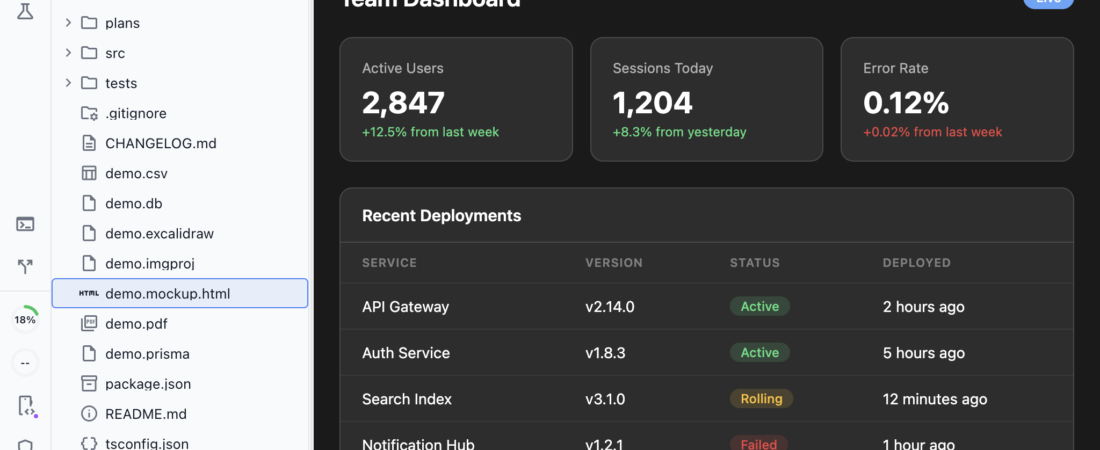
- UI Mockup Editor: Design interfaces that your agents can implement
- Excalidraw Diagram Editor: Create system architecture and flow diagrams
- Mermaid Diagram Editor: Generate diagrams from text descriptions
- Data Model/ERD Editor: Design database schemas visually
- CSV Spreadsheet Editor: Work with structured data
Each editor supports AI-assisted editing, meaning Claude Code or Codex can make changes that you review and approve inline. This eliminates the frustrating copy-paste cycle that plagues many AI coding workflows.
Integrated Task Management and Planning
Here’s where Nimbalyst gets really interesting. The task tracking isn’t bolted on as an afterthought – it’s deeply integrated with your agent sessions. When your tasks live where you work, your agents can see what needs doing, and your task board reflects what’s actually happening in real-time.
Tasks are stored as markdown files with frontmatter metadata, which means your AI agents can read them, update them, and even create new tasks based on their work. This creates a feedback loop where your project management automatically stays synchronized with your development progress.
The platform supports a context graph where every artifact – tracker items, plans, specs, diagrams – is a typed node that agents can traverse. This means when you ask an agent to “implement the feature from the mockup in task #12,” it can actually follow those relationships and pull in the right context automatically.
Developer-Focused Features
Beyond the workspace and planning tools, Nimbalyst includes a full Developer Mode with capabilities you’d expect from a professional development environment:
- Terminal Access: Built-in terminal for running commands, tests, and deployments
- Git Integration: AI-assisted commits, branch management, and worktree support
- Pull Request Review: Visual diff review with file-by-file navigation and inline annotations
- File Management: Organize project files with session associations
The git worktree support deserves special mention. When you create a new session for a feature, Nimbalyst can automatically create an isolated worktree for that work. This means multiple agents can work on different branches simultaneously without stepping on each other’s changes.
How Nimbalyst Compares to Alternatives
Nimbalyst vs. Claude Code Desktop
After spending significant time with both tools, the comparison comes down to use cases rather than “better or worse.”
Claude Code Desktop wins when:
- You want the official, most direct path to new Anthropic features
- Your workflow centers on deep, focused single-session coding work
- You need Computer Use capabilities (Anthropic’s agent that can control your desktop)
Nimbalyst wins when:
- You’re managing multiple parallel agent sessions across different projects
- Your work spans code, specs, mockups, diagrams, and documentation
- You want to run Claude Code and Codex together in one workspace
- Session inventory management matters more than individual chat threads
Many developers (including the Nimbalyst team themselves) keep both installed because their work includes both patterns. Monday might start in Nimbalyst coordinating three parallel feature sessions, while Tuesday involves opening Claude Desktop for a deep architectural problem that benefits from one long, focused thread.
Nimbalyst vs. Obsidian + Claude Code
Some developers cobble together a workflow using Obsidian for planning and documentation, Claude Code for implementation, and an IDE for code review. Nimbalyst consolidates this stack into a single application.
The advantage of the Obsidian approach is flexibility and familiarity – you might already have years of notes in Obsidian. The advantage of Nimbalyst is integration – your agents work with the actual artifacts in the workspace, without context-stitching through prompts.
If you’re heavily invested in the Obsidian ecosystem, the hybrid approach makes sense. If you’re starting fresh or willing to migrate, Nimbalyst’s unified environment eliminates significant friction.
Pricing: Free for Individuals, Teams Plans Available
One of Nimbalyst’s most compelling aspects is its completely free individual tier. This isn’t a limited trial or feature-restricted version – it’s the full platform with no time limits, no credit card required, and no hidden costs.
Individual Plan: $0
The free tier includes:
- Full Nimbalyst editor and workspace
- Support for Claude Code, Codex, OpenCode, and GitHub Copilot
- All visual editors (markdown, mockups, diagrams, code, spreadsheets)
- Session manager with searchable history
- Integrated task management and kanban
- Terminal, git management, and worktrees
- Extension system for custom editors
- Mobile app for iOS
- MCP (Model Context Protocol) server support
- File link sharing
Important to understand: You need your own AI access. Nimbalyst doesn’t provide the AI – you bring your Claude Code subscription, Codex API key, or other provider. The workspace is free; the underlying AI is what you’re already paying for.
Teams Plan: $20/user/month (Currently Free During Beta)
The Teams tier adds real-time collaboration features:
- Multiplayer editing on markdown, mockups, and diagrams
- Shared trackers and kanban boards worked by both team members and agents
- File promotion to shared docs with full change history
- Collaborative extensions
Currently in beta and free to use, so teams can try the full collaboration experience before paying. When it moves to general availability, pricing is $20/user/month or $200/user/year.
Enterprise Plan: Custom Pricing
For organizations needing:
- Collaboration server in your own cloud (Cloudflare or managed)
- Source code access to collaboration infrastructure
- Data residency controls
- Custom agent gateways and spend controls
- Embedded engineering support during onboarding
- Custom multiplayer extensions for proprietary artifacts
Enterprise pricing is custom and starts with a conversation with the Nimbalyst team.
Real-World Use Cases: Who Benefits Most from Nimbalyst?
Developers: From Debugging to Documentation
Software engineers use Nimbalyst across the full development lifecycle. You can:
- Debug issues: Paste a stack trace, get root cause analysis with proposed fixes
- Plan features: Write PRDs in markdown, break them into tasks, hand to agents
- Generate diagrams: Create architecture diagrams and system maps from descriptions
- Review code: Inspect AI-generated changes with visual diffs before accepting
- Manage releases: Automate changelogs, version bumps, and release notes
- Write documentation: Generate and maintain docs that stay current with your codebase
The pattern that emerged from developer testimonials is using Nimbalyst as a “team lead for AI agents.” When you’re coordinating 10+ parallel sessions, you need the organizational structure that Nimbalyst provides.
Product Managers: Bridging Planning and Implementation
PMs benefit from Nimbalyst’s ability to span non-technical and technical artifacts:
- Market research: Run competitive analysis with SWOT matrices and feature comparisons
- Feature planning: Create detailed specs with mockups and user flow diagrams
- Track progress: Monitor what engineering (human or AI) is building in real-time
- Technical insight: Understand codebases without reading code directly
One PM mentioned in a Reddit discussion: “I discovered Nimbalyst because I was looking for better ways to work on documents in Claude Code. I occasionally code, but my profitable work is meetings, writing, and planning.” The platform bridges the gap between planning artifacts and implementation work.
Designers: Visual Workflows with AI Assistance
Designers use Nimbalyst for:
- Mockup creation: Generate wireframes from text descriptions
- Prototyping: Build working HTML prototypes in single conversations
- User flow design: Map journeys and UX flows with AI-generated diagrams
- Design systems: Maintain component libraries and style guides
- Implementation review: Check engineering work against mockups
The fact that the same agent can design a mockup and then implement it in code creates a tighter feedback loop than traditional design handoff processes.
Getting Started: From Download to First Session
Installation Process
Nimbalyst is a desktop application available for macOS, Windows, and Linux. The installation is straightforward:
- Download from the official website
- Install like any native application
- Launch and configure your AI provider (Claude, OpenAI, etc.)
- Start your first session
No account creation is required for the individual tier. You can be working with your first agent session within 5 minutes of downloading.
Connecting Your AI Providers
Nimbalyst supports multiple authentication methods:
- Claude Code subscription: Use your existing Anthropic subscription
- API keys: Connect with keys from Anthropic, OpenAI, or other providers
- Local models: Use LM Studio to run models on your own hardware
- Codex access: Connect your OpenAI Codex credentials
The platform is provider-agnostic, so you’re not locked into a specific AI vendor. You can even use different models for different sessions based on the task at hand.
Your First Workflow
A typical first session might look like this:
- Create a task on the kanban board: “Add user authentication to the app”
- Start a planning session: Have Claude Code help you write a spec in markdown
- Generate a mockup: Create the login UI mockup using the visual editor
- Create an implementation session: Have Codex implement the backend logic
- Review the diff: Inspect the proposed code changes file by file
- Accept and commit: Approve the changes and commit with an AI-generated message
Throughout this workflow, you never leave Nimbalyst. The context flows naturally from planning to design to implementation to review.
Mobile App: Managing Sessions from Anywhere
The iOS mobile app is an underrated but valuable component of the Nimbalyst ecosystem. It’s not designed for writing production code on your phone (that would be painful), but it excels at:
- Checking session status while away from your desk
- Reviewing and approving completed diffs
- Answering blocked questions that are holding up an agent
- Reading transcript outputs
- Moving tasks between kanban phases
The mobile workflow matters more than people initially expect. Being able to unblock a session during lunch or approve a change while commuting keeps parallel work moving forward. It’s the difference between a session sitting idle for hours versus continuing to make progress.
Extensions and Customization
Nimbalyst includes a first-class extension system that treats extensions as peers to built-in functionality, not as second-class guests. This architecture allows you to:
- Build custom visual editors for proprietary file types
- Add new agent providers beyond Claude Code and Codex
- Create specialized workflows for your team’s unique processes
- Integrate with external tools and services via MCP (Model Context Protocol)
The extension marketplace already includes community-built extensions for specialized use cases. And because Nimbalyst is open-source, you can fork the entire application if you need deeper customization.
Model Context Protocol (MCP) Support
MCP integration means your agents can connect to external tools and services:
- Linear: Create and update issues
- GitHub: Manage repositories and PRs
- Slack: Send notifications and updates
- Databases: Query and modify data directly
This turns your AI agents from code generators into full-stack workflow orchestrators.
Security, Privacy, and Data Control
As an open-source, local-first application, Nimbalyst takes a strong stance on data ownership:
- Local Storage: Your work lives on your machine, not on Nimbalyst’s servers
- Bring Your Own Key (BYOK): Use your own API keys; Nimbalyst doesn’t see your AI conversations
- SOC 2 Type 2 Compliance: For teams and enterprise deployments
- Open Source Transparency: MIT license means you can audit every line of code
For enterprise deployments, the collaboration server can run entirely in your own cloud (Cloudflare Workers or your preferred environment), ensuring data never leaves your jurisdiction.
This architecture means you’re not trusting a third-party service with your codebase, intellectual property, or AI conversations. Everything stays under your control.
Performance and Reliability
Based on user reports and personal testing, Nimbalyst performs well across different hardware configurations. Sessions maintain state reliably, and the UI remains responsive even when managing multiple concurrent agent sessions.
One Reddit user noted: “The mobile app is great. You can check in on and take action on a session remotely. It’s generally quite reliable, but your computer must be on and Nimbalyst must be running for remote sessions to work.” This highlights the local-first architecture – the mobile app connects to your desktop instance rather than a cloud service.
The git worktree isolation is particularly robust. Multiple sessions working in parallel don’t interfere with each other, and the visual diff review system makes it easy to understand exactly what each agent changed.
Potential Drawbacks and Limitations
No tool is perfect, and Nimbalyst has some considerations worth mentioning:
Learning Curve for New Users
If you’re coming from simple chat interfaces, Nimbalyst’s workspace paradigm requires a mental shift. You’re not just “talking to an AI” – you’re managing sessions, organizing tasks, and coordinating multiple agents. This added complexity is the source of its power, but it does mean more to learn upfront.
Requires Running Desktop Application
Unlike web-based tools, you need to install and run the desktop app. For remote session management to work from mobile, your computer must be on and Nimbalyst must be running. This is a trade-off of the local-first architecture – great for privacy and control, less convenient than always-available cloud services.
Still Evolving
As an actively developed open-source project, features are continually being added and refined. The Teams collaboration features are currently in beta, for example. Early adopters should expect occasional updates and evolving best practices.
Not a Substitute for Deep AI Knowledge
Nimbalyst makes managing AI coding agents easier, but it doesn’t eliminate the need to understand how to prompt effectively, when to break tasks into smaller pieces, or how to review AI-generated code critically. It’s a productivity multiplier for people who already work effectively with AI, not a magic solution for those still learning the fundamentals.
Community and Support
The Nimbalyst community is growing across several channels:
- GitHub Repository: Active development with regular commits and community contributions
- Reddit Community (r/Nimbalyst): User discussions, tips, and support
- Official Documentation: Comprehensive guides and use case examples
- YouTube Channel: Tutorials, demos, and workflow videos
The company is backed by recognizable names in tech, with users from Automattic, Amazon, Redfin, Vanta, Gainsight, Zillow, UKG, Twilio, Yahoo, and Amperity mentioned on their homepage.
Final Verdict: Who Should Use Nimbalyst?
After extensive testing and research, here’s my honest assessment:
Nimbalyst is excellent for:
- Developers managing multiple AI coding sessions across different projects
- Teams coordinating AI-assisted development with shared context
- Anyone whose work spans code, specs, mockups, diagrams, and documentation
- Product managers and designers who work closely with engineering
- Individuals who want a free, open-source alternative to proprietary AI coding tools
Nimbalyst might not be necessary if:
- You primarily work in single, deep coding sessions focused on one problem
- You’re satisfied with terminal-based AI interactions
- Your workflow doesn’t involve parallel session management
- You need the absolute latest features from specific AI providers first
The tool shines brightest when you’re orchestrating complex development work across multiple dimensions. If your bottleneck is managing the inventory of agent sessions rather than the quality of individual sessions, Nimbalyst directly addresses your pain point.
Comparison to Other AI Coding Tools
To help you contextualize Nimbalyst, here’s how it compares to other popular tools in the space:
| Feature | Nimbalyst | Claude Code Desktop | Cursor | GitHub Copilot |
|---|---|---|---|---|
| Multi-agent support | ✅ Claude Code + Codex | ✅ Claude only | ✅ Multiple models | ✅ Copilot models |
| Parallel sessions | ✅ Unlimited | ✅ Limited | ❌ Single | ❌ Single |
| Visual editors | ✅ 7+ types | ⚠️ Basic | ⚠️ Code only | ❌ None |
| Task management | ✅ Integrated kanban | ❌ None | ❌ None | ❌ None |
| Open source | ✅ MIT license | ❌ Proprietary | ❌ Proprietary | ❌ Proprietary |
| Pricing (individual) | ✅ Free | ✅ Free tier | 💰 $20/month | 💰 $10/month |
| Mobile app | ✅ iOS | ✅ iOS/Android | ❌ None | ❌ None |
| Git worktrees | ✅ Built-in | ✅ Built-in | ⚠️ Manual | ⚠️ Manual |
For more detailed comparisons with AI development tools, check out these resources on ToolExpertAI.
Frequently Asked Questions
Q: Do I need to pay for Nimbalyst AND my AI subscription?
No. Nimbalyst itself is free for individual use. You pay for your AI access (like Claude or OpenAI), and Nimbalyst provides the workspace to use those agents more effectively.
Q: Can I use Nimbalyst offline?
The desktop application runs locally, but you’ll need internet connectivity to communicate with cloud-based AI services like Claude Code or Codex. If you’re using local models through LM Studio, you can work entirely offline.
Q: How does Nimbalyst handle my code and data?
All your work is stored locally on your machine. Nimbalyst doesn’t upload your code to its servers. When you use AI features, your prompts and code go directly to your chosen AI provider (Anthropic, OpenAI, etc.) according to their terms of service.
Q: Is Nimbalyst suitable for beginners?
It depends on your definition of “beginner.” If you’re new to AI coding assistants in general, start with simpler tools to learn the basics. If you’re comfortable with AI agents but new to managing multiple sessions, Nimbalyst’s organizational features will help rather than hinder.
Q: Can I use Nimbalyst for non-coding work?
Absolutely. Many users employ Nimbalyst for writing, planning, and designing without touching code. The markdown editor, mockup tools, and diagram editors work well for product managers, technical writers, and designers.
Getting the Most Out of Nimbalyst: Pro Tips
Based on user experiences and best practices:
- Start with the kanban board: Even if you’re only managing one session initially, using the task board builds the habit for when your workload expands.
- Use worktrees liberally: Don’t be afraid to create isolated worktrees for experimental work. It’s easy to clean them up if the experiment doesn’t pan out.
- Review diffs carefully: The visual diff review is one of Nimbalyst’s strongest features. Take time to understand changes before accepting them.
- Leverage the context graph: Explicitly link related artifacts (tasks to specs to mockups to code) so agents can traverse relationships automatically.
- Mix agents strategically: Use Claude Code for some tasks and Codex for others based on their strengths. Run them in parallel on different features.
- Set up MCP integrations: Connecting your tools (Linear, GitHub, Slack) early multiplies the value of your agent sessions.
- Use the mobile app for unblocking: Keep work moving by handling simple approvals and questions from your phone.
Conclusion: A Workspace for the AI-Assisted Future
Nimbalyst represents a thoughtful answer to a real question: as AI coding agents become more capable, what environment do we need to work with them effectively?
The answer isn’t just “a nicer chat interface.” It’s a comprehensive workspace that treats AI agents as team members who need management, coordination, and integration with the artifacts we’re actually building. It’s parallel session management, visual editing across multiple artifact types, integrated task tracking, and mobile accessibility all working together.
For individual developers, the value proposition is straightforward: it’s free, open-source, and either it solves your workflow problems or you don’t use it. For teams, the collaboration features in the upcoming Teams tier promise to extend the same agent-native workspace to entire groups.
If you’re juggling multiple AI sessions, constantly switching between tools, or losing context as your agents make changes, try Nimbalyst. Download it, connect your AI provider, and run it alongside your current tools for a week. The value shows up quickly if it matches your workflow.
The future of development isn’t choosing between human work and AI work – it’s orchestrating both in an integrated environment. Nimbalyst is building that environment, and they’re doing it in the open.
Ready to transform your AI-assisted development workflow?
- 🔗 Download Nimbalyst (Free for individuals)
- 📚 Explore the documentation
- 🎥 Watch tutorial videos
- 💬 Join the community on Reddit
- ⭐ Star the GitHub repository
For more AI tool reviews and comparisons, explore ToolExpertAI’s comprehensive guides on the latest development tools and platforms.
Related Resources:
- Understanding Claude Code: The Complete Guide – Deep dive into Claude Code capabilities
- Codex vs Claude Code: Which AI Coding Assistant Is Right for You? – Side-by-side comparison
- Best AI Development Tools in 2024 – Comprehensive roundup of AI coding assistants