
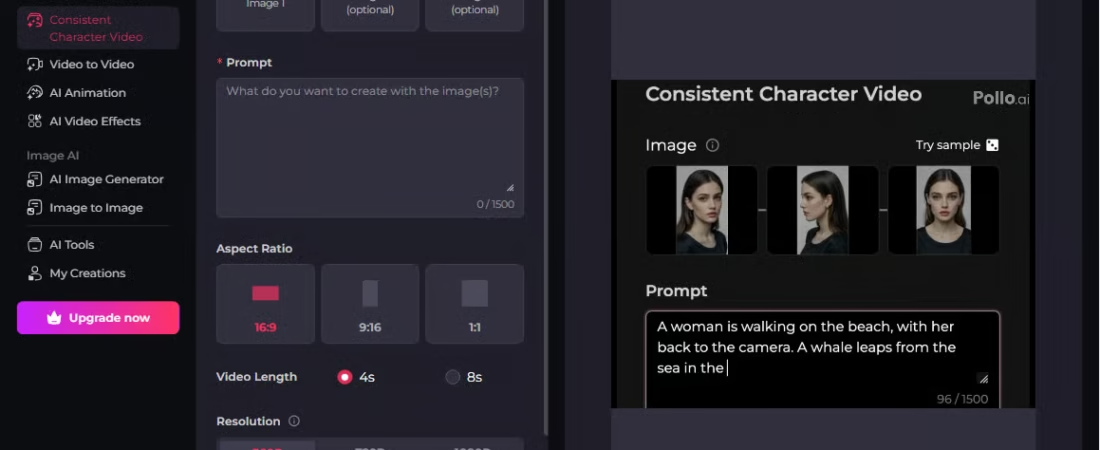
Your AI video character changes between scenes because most video models have no memory — every clip is generated from scratch, from random noise, guided only by your text prompt. Unless you explicitly anchor the model to a reference image or a built-in consistency feature, it isn’t recreating your character. It’s re-imagining a stranger who happens to match the description.
If that stings a little, I get it. You spend twenty minutes perfecting a prompt, generate a gorgeous opening shot, and then scene two hands you a completely different human being. Same hair color, maybe. Nothing else.
Here’s the good news: character drift isn’t random bad luck, and it isn’t a curse. It’s a mechanical problem with mechanical fixes — and in 2026, the tools finally give you real levers to pull. This guide breaks down exactly why the drift happens and the five fixes that actually work, with the tool features that support each one.
Why AI Video Models Break Character Consistency
Let’s start with the “why,” because once you understand it, the fixes stop feeling like superstition.
As Pixo Video’s 2026 consistency guide puts it: “Most text-to-video models generate each clip in isolation. They have no memory of the previous shot, so every generation is a fresh roll of the dice on what your character looks like.”
That’s the root cause. Everything below is a symptom of it.
1. There’s no memory between generations
Current video models predict frames from text descriptions and latent representations — nothing more. As one developer who stress-tested four major tools wrote: “Each generation pass is essentially independent — the model doesn’t have a persistent understanding of ‘this is Character A and they should always look exactly like this.’” (source)
The model isn’t looking at your scene one output when it makes scene two. It can’t. To a video model, every prompt is the first prompt ever written.
2. Your prompt describes a region, not a person
Text is a lossy format for faces. “A young woman with auburn hair and green eyes” matches thousands of possible humans — the model fills in cheekbones, jaw width, and eye spacing from its own imagination, differently every time. Two clips from the same prompt can give you two different people, and both of them technically match what you typed.
3. Random seeds re-roll the dice
Every generation starts from random noise, and that noise (the seed) shapes the outcome. Change the seed and you change the person — even with a word-for-word identical prompt. It’s why “just regenerate it” so often makes things worse.
4. Small wording shifts cause big drift
This one bites even experienced creators. Describe your character in a “black jacket” in scene one and a “dark coat” in scene two, and the model treats them as different garments. Paraphrase anything — hair, build, wardrobe — and you nudge the output toward a different person. The drift compounds scene by scene until your protagonist is unrecognizable.
5. New angles and close-ups amplify the problem
A tight close-up magnifies every inconsistency in facial structure. A behind-the-shoulder shot forces the model to invent details your prompt never specified. The harder the camera work, the more the model improvises — and improvisation is where consistency goes to die.
How to Keep the Same Character Across Scenes: 5 Proven Fixes
Now for the part you came here for. These five fixes stack — use them together and character consistency in AI video stops being a lottery.
Fix 1: Use reference images (the single biggest upgrade)
Reference images are exactly what they sound like: you upload a still of your character, and the model anchors its output to that face instead of to your prose. Most major tools support some version of this now — Kling calls them Elements, Runway calls them Gen-4 References, and Google’s Veo 3.1 supports Ingredients. Vidu lets you upload up to seven reference images covering characters, objects, and scenes in one generation.
Kling’s Elements feature locks a character’s appearance from uploaded reference images.
Don’t upload just one image, though. Build a small reference set before you generate anything:
- One clear, front-facing image
- A side profile
- One or two expression or outfit references (plus a full-body shot if your character moves a lot)
- A written description — hair, clothing, colors, distinguishing features
That last bullet matters more than people think. The reference set and the written description should travel together, unchanged, into every single generation.
Fix 2: Lock your character block word-for-word
Free, universal, and criminally underused. Write your character’s description once — a tight block covering age, hair, eyes, build, wardrobe, and one or two distinguishing features — then paste it identically into every prompt, in the same position. Never paraphrase. Never let an AI assistant “improve” it mid-story.
Think of it as a variable in a script. If the string changes, the output changes.
Fix 3: Reuse the seed (where your tool allows it)
Many platforms let you pin or reuse the seed from a generation you liked. Pair a fixed seed with a fixed character block and you’ve eliminated two of the three random variables. It won’t survive dramatic camera changes, but for scenes shot in similar styles, it’s remarkably effective — and it costs nothing.
Fix 4: Use multi-shot and consistency modes
The newest models generate several connected cuts in one pass, holding identity across them natively. Seedance 2.0 generates multi-shot sequences while holding facial features and clothing across transitions, and Kling 3.0’s multi-shot workflow uses its Elements system to keep a character locked across cuts within a generation. If your tool has a multi-shot, “consistent character,” or “story” mode, use it — then verify the last shot against the first before you build on it.
Vidu’s Reference-to-Video accepts multiple reference images to keep characters and objects consistent.
Fix 5: Go deeper — character sheets, LoRA, and compositing
For series-level projects, the power tools are worth the learning curve:
- Train a LoRA on 20–30 images of your character so the model literally learns their face. It’s the most robust option for open-model workflows, and the heaviest lift.
- Composite instead of generating. Generate your character once in a neutral pose, extract them, and composite onto separately generated backgrounds. Full control, zero drift.
- Keep a character bible. Writers solve this exact problem with knowledge-graph tools that pin character details so nothing contradicts between chapters — our Story Prism review covers one such canvas tool that maps characters, scenes, and plot points as connected nodes. The same discipline translates directly to video production.
Which AI Video Tools Handle Character Consistency Best in 2026?
| Tool / model | Consistency mechanism | Strength |
|---|---|---|
| Seedance 2.0 / 2.5 | Native multi-shot identity hold | Strongest across shot transitions |
| Kling 3.0 | Elements (reference-locked appearance) | Strongest across separately generated clips |
| Veo 3.1 | Ingredients reference images | Photorealism; slightly less precise identity |
| Runway Gen-4 | References + mature motion control | Cinematic control within and across clips |
| Vidu | Up to 7 reference images per generation | Multi-element scenes (characters + objects) |
| Hailuo | Solid in-shot identity | Budget pick for b-roll |
| Higgsfield | Character presets, stylized looks | Stylized short-form content |
| Atlabs | “Consistent Cast” system | Series-level: same cast across episodes |
Summarized from the Pixo Video comparison and the Atlabs 2026 tool guide. The useful distinction Atlabs draws: clip-level consistency (a subject stable inside one generation — largely solved in 2026) versus series-level consistency (the same cast across many scenes and episodes — still the hard part). Match the tool to the level you actually need.
Runway’s Gen-4 References generates multiple shots of the same character from one reference.
A Reality Check Before You Plan Your Project
How good is “good” in 2026? One developer documented a real client project — a 60-second explainer with one spokesperson across 8 scenes — testing Runway, Kling, Seedance, and Pika:
- Runway: photoreal, but visible drift in hair length, skin tone, and facial structure. Roughly 18 regeneration takes per scene.
- Kling: face held well via reference pinning, but wardrobe shade shifted. About 80% consistency.
- Seedance: best motion, worst identity — a “completely different person” in 3 of 8 scenes.
- Pika: fine at similar angles, fell apart when the camera moved from medium shot to close-up.
The client ultimately hired a real actor (full write-up). The lesson isn’t “don’t use AI video” — it’s that shot count multiplies risk. Generate one scene per clip and edit them together rather than asking one prompt for a multi-scene story, keep camera language conservative for key scenes, and budget regeneration takes for close-ups.
Want to see the workflows in action? These walkthroughs are current and practical:
- Kling 3.0 keeps characters consistent across scenes — prompts included
- Consistent characters across unlimited camera angles (Higgsfield)
- 7 updated tips for character & background consistency
- Long AI videos with consistent characters (OpenArt workflow)
- Long-form AI animation with consistent characters (Veo 3.1)
FAQ: AI Video Character Consistency
Why does my AI video generator character change between scenes?
Because the model has no memory between generations — each clip is re-created from your text prompt and random noise, so it reconstructs a new version of the character every time. Fix it by attaching a reference image (or using a multi-shot mode) and pasting an identical character description into every prompt.
How do I keep the same character across multiple AI video scenes?
Use a locked reference set — front-facing image, profile, and outfit shots — attached to every generation, plus a word-for-word identical character description and a reused seed where supported. Generate one scene per clip and edit the clips together.
Does fixing the seed keep my AI character consistent?
It helps, but it’s not enough alone. A fixed seed removes one random variable; the model can still drift when your prompt wording or camera angle changes. Combine it with reference images for reliable results.
What is a character reference in AI video tools?
It’s an uploaded image the model uses as a visual anchor for a character’s face, hair, and wardrobe — called Elements in Kling, References in Runway Gen-4, and Ingredients in Veo 3.1. It’s the most effective single fix for character drift.
Which AI video generator is best for consistent characters in 2026?
Seedance 2.x leads for multi-shot identity within one generation, Kling 3.0’s Elements leads for consistency across separately generated clips, and Atlabs targets series-level consistency across episodes. For image-first workflows, generating reference stills with a multi-model platform like Fiddl.art — which bundles Sora 2 Pro, FLUX 2, and other models under one pay-as-you-go roof — keeps your whole reference pipeline in one place.
Can I train an AI model to remember my character?
Yes — LoRA fine-tuning trains a lightweight model adapter on 20–30 images of your character, and it’s the most robust option for long-running series. It requires open-weight models and some technical setup, so most creators start with reference images instead.
The Takeaway
Why does your AI video generator character change between scenes? Not because you’re doing anything wrong — because the model starts from zero every time, and text was never a precise enough format to define a face. Anchor it to images, freeze your wording, reuse your seed, and let multi-shot modes carry the load. Do those four things and your character will still look like themselves in scene eight.
And if you’re building the pipeline end to end: create your reference stills first (our ArtSpace AI review covers a one-click editor whose Pose Studio adjusts a subject’s posture without changing their face — handy for building a reference set), plan scenes and continuity in writing before you generate, and treat consistency as a production discipline rather than a prompt trick. That mindset shift is what separates watchable AI video from an uncanny reel of near-identical strangers.